# Getting into the APK
First of all, we need to understand what kind of sample this one is. For this, let's choose the APK Analysis tab.
Here you can see basic information regarding the sample. In our case, we are dealing with a specific trojanized application. This means that we need to identify which version of the application is targeted.
With some quick online research, we can find that this version was released on [1 March 2021](https://www.apkmirror.com/apk/wire-swiss-gmbh/wire/wire-3-65-979-release/wire-secure-messenger-3-65-979-android-apk-download/).
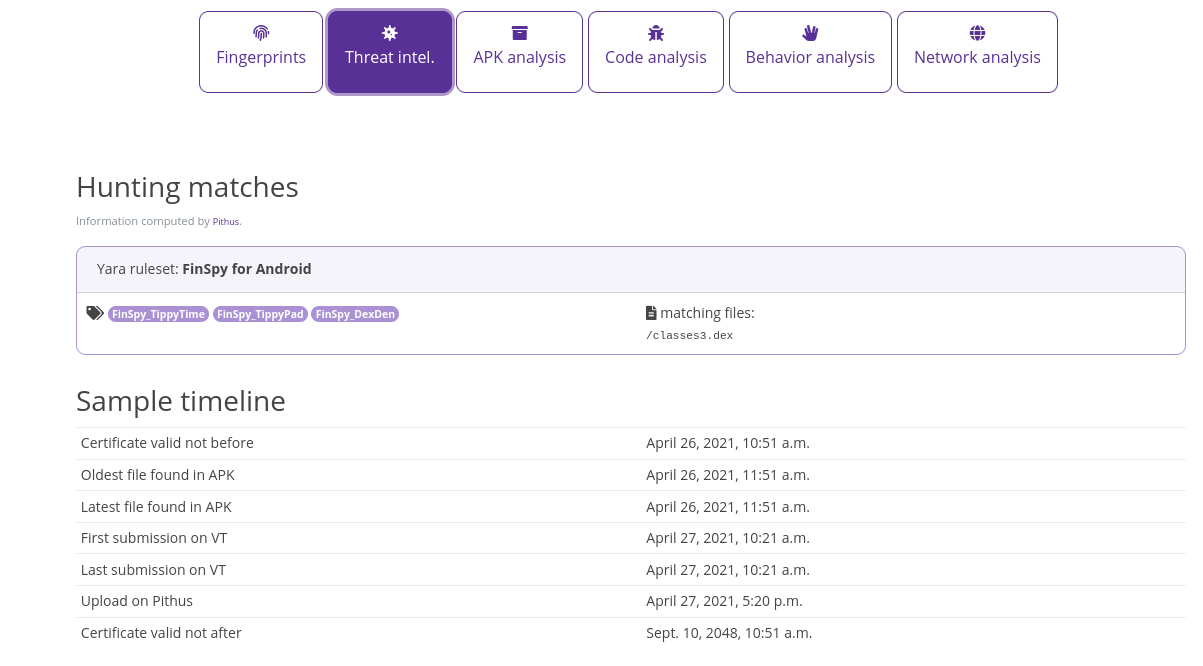
In the **Threat Intel tab**, we have a timeline of events that could tell us about the time the malware was active or is supposed to be active.
As we can see, the [X.509 certificate](https://en.wikipedia.org/wiki/X.509) was created to work from 26 April 2021, and the oldest files from the samples were identified around that time. Two months after the release of the version of the legit APK.
In the **APK Analysis tab**, we can find the main activity for this application (if you need to refresh your memory on activities, check out the [Android developer's documentation](https://developer.android.com/guide/components/activities/intro-activities). The main activity is an important point in your analysis. Indeed, when you look into the APK, you might want to start from there, so it's important to identify it in the early stages of your work.
After having identified a potentially malicious activity, let's browse the [Manifest](https://developer.android.com/guide/topics/manifest/manifest-intro) and look for actions that are triggered by this activity. You will find that information in the APK Analysis tab.
Now moving on to the **Behavior Analysis tab**, where we will gather some general information on how the APK is behaving. The first part of the tab looks into the permissions that the APK will be requesting. This is a good indicator to identify what kind of resources will be used.
This APK is requesting an extensive amount of permissions. This might not be entirely suspicious, depending on what this application is doing. In this case, the trojanized application is supposed to act as a chat application so requesting contacts or camera access are not surprising. Nonetheless, one must be wary of what kind of requests are made.
Later on, on the same page on Pithus, we scroll to the **Threat Analysis section**. The analysis there is based on a tool called [Quark](https://github.com/quark-engine/quark-engine). With these tools, it is possible to identify a number of "crimes" (as they call them) to map the behaviour of Android malware.
For our sample, we have a number of crimes identified. Check the questions related to this theme before moving on.
Moving on to identify classes that have behaviors we would want to look at. Scroll down to the **Behavior Analysis**. Here we can see the name of the classes that have the identified behaviors, which will give us valuable pivot points when analyzing the APK.
Now we'll check out how the **Network Analysis** tab. Here you will see a number of domains that have been identified and are queried by the APK. Here you will see a number of domains that have been identified and are queried by the APK. Considering that we work on a high-profile case here, it is less likely we'll easily discover clues. Indeed more advanced malware will obfuscate the domain or IP it communicates to avoid detection.
Take some time to review the network page and the clues that we have gathered so far and move on to the next section: hunting!